New Applications Directly Supporting Squareness Look And Feel

| Tags: dev, java

I came across two other applications which directly support Squareness Look And Feel.

The “Magic-Project” is a computerized version of Magic The Gathering, a very famous collectible card game, that can be played in a LAN or over the internet. The Magic Project comes preinstalled with Squareness Look And Feel and other look and feels. I’ve never played Magic and so I don’t understand the program, but it looks good - especially with Squareness switched on :)

WordRider is a text editor for a very special text format that can be read on the TI-89 calculator. It’s base installation package doesn’t contain Squareness, but there is a link to Squareness on the website and Squareness will be available in the “Look & Feel”-menu if you put the jar file in WordRider’s lib directory.

In the meanwhile I have released an update to the look and feel, which fixes a bug reported by the author of the Magic-Project. Strangely there was a recursion that only occurred on JDialogs that used look and feel painted window decorations (border and window buttons). Fortunately finding and fixing the bug only took about 6 hours.

I think finding it was so fast because of YourKit Profiler. The bug resulted in 100% CPU time consumption. So I started the profiler, had a look at the findings and nearly immediately got the idea what was wrong. Without the profiler I would have been forced to use System.out debugging or real step-by-step-debugging, which probably would have been a bit difficult. But so, it was a breeze. Somehow I never used profilers before, partly because they nearly always look very complicated with all their graphs and partly because they are mostly very expensive. Those two statements aren’t true of Yourkit Profiler. The personal license is rather cheap and the generated snapshots are very clean and readable.

Back to Squareness: I also released an updated version of the Windowblinds skin. It has been quite some time since the last release. I originally planned to make a 2.0 release that would come with some new color schemes and would be accompanied by a finished Colorizer. But that will take some more time and this new release contains some bugfixes and improvements which I just didn’t want to keep from the public any longer.

Firefox New York Times Ad Arrives

| Tags: tool, browser

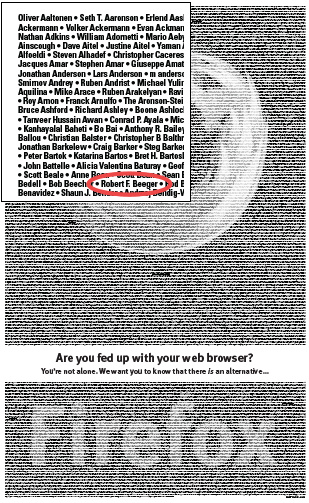
The Firefox ad has finally made it into the New York Times. Like 8000 other Firefox users I have donated 30$ to make this real. Unlike many who have the bad luck of having their name written wrongly or even not at all in the ad, my name made it into the ad without any bugs.

With 8000 names having to share the space of one page, there isn’t much room for each individual name. So the names are printed in a fairly tiny font. I have printed the ad out on an A4 page and need a magnifying glass to read any of the names on it. If I remember correctly the New York Times uses a somewhat bigger format than A4. So in it’s original printed form the names might be readable.

From an economical point of view 30$ for that little space is much money. But on the other hand it doesn’t really matter to stand out and be clearly visible in this case. More important is to be part of a bigger movement. I wonder if this movement will be strong enough to overthrow MS Internet Explorer. I surmise those 8000 people are mainly geeks and nerds. Many internet users still don’t know what Mozilla is and that there are alternatives to IE. This and other ads are a good starting point to make it known that there is something besides IE. One problem still stays: Many users just don’t care which browser they use. They use IE since it is preinstalled on Windows.

Here’s the ad in a reduced size with its upper left corner magnified to show off that I’m really in ;)

Firefox New York Times Ad

TaskSwitchXP Easter Egg

| Tags: tool, windows

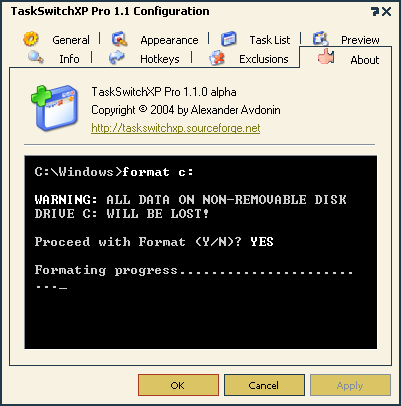
TaskSwitchXP Pro 1.1 alpha contains a funny easter egg in the about box of its configuration tool. If you wait long enough for all the credits to show up and disappear again, you’ll see a c: prompt on which magically the most feared command of all time appears “format c:” The security question is answered with “YES” and then the formatting starts.

Of course nothing really happens, but somehow one takes a deep breath and at first thinks “Shit! That can’t be real”. Then the brain starts to work and recognizes this as a very rude but afterwards funny joke.

TaskSwitchXP screenshot showing the easter egg

Mazera

| Tags: game

Mazera is a fun game for PalmOS. It contains some really original ideas and the ingame arcade games such as “Bug Pong”, “Bug Breakout” etc. are quite cool.

There is also a secret level that is worth searching for. It’s called “Strange Place”. It looks partly like a chest of small things that didn’t fit anywhere else. There is also a big office that somehow looks out of place in the world of Mazera. It turns out to be the office of the developers of Mazera (like the office of the Architect in Matrix). You also meet the main programmer in front of his computer asking “What would Carmack do”.

Screenshot from Mazera

That’s quite funny indeed if you remember that John Carmack was the main programmer of the famous Commander Keen, which was back then the first really fast jump’n’run game on the x86 platform that was as good in performance and graphics as the games on game machines by Nintendo and others.

After that joke I really expected to find a All your base are belong to us quote anywhere in the game, but I didn’t find any.

Language Oriented Programming with MPS

| Tags: dev

JetBrains now have an own mag named onBoard. One of the first articles is about Language Oriented Programming (short: LOP) and about MPS (Meta Programming System), which is or will be a development environment for LOP integrated into IDEA.

The ideas behind LOP sound strange and fantastic at the same time: You develop some languages to be able to develop another application. This reminds of Donald E. Knuth who invented TeX in order to be able to write his “The Art of Computer Programming”. And indeed Knuth is referenced in the onBoard-article.

To be sincere I don’t know what to think about it. It’s interesting and even intriguing but at the same time I cannot imagine what will be possible with this MPS thing and it is not really obvious to me that it will help at getting a job done. Well, I’ll have to wait till I get this thing into my hands to see how it feels and to make any learned comments about the whole matter.

Why Names Matter

| Tags: dev

When I was beginning to develop Squareness more than a year ago, I also began to search for a name. I knew I would release it someday. So it was clear it needed some name. After some thoughts I came up with “Square”, but a search on Wincustomize.com showed that there was already a skin named “Square”. Some more thoughts and there was “Squareness”. I deemed myself witty back then, because “Squareness” has more than one meaning. It not only describes the form of most controls in this skin - most of them are of rectangular shape, in case you didn’t notice :) . “Squareness” is also another word for “sincereness”. So naming the thing “Squareness” gave it also some kind of sentimental touch.

While the name is as good as any other name I could have chosen, it has a big disadvantage I didn’t realize until it was too late. Try to google “Squareness”. You’ll get my “Squareness”-site as the topmost result, which is a good thing. But the rest is mostly about the “squareness of web-graphics” and the like. The problem is that when I want to scan the web and see where my skin is talked about, I have to wade through tons of sites that simply talk about other square things.

When I started this thing, I simply didn’t think I’d once be interested in this sort of information that is now hard to get because of the naming. I notice for example fluctuations in the amount of downloads of the instances of Squareness.

Normally when I publish a release, it takes some days to be discovered. In the first three or four days it is only downloaded once or twice a day. Then something happens and it gets 20 downloads on the same day, pushing the project’s activity score up to 80%. This holds for some days, then breaks down to five downloads a day and returns to 15 to 20 downloads again some days later. It’s very fascinating to watch this development, though I just cannot pin down any reason for it. On one of my searches for this reason I came across a forum in a language which was neither German, English nor Polish. In a thread on this forum some guy posted three links to three look and feels for Java Swing. One of those links pointed to Squareness. So Squareness has some fans out there who recommend it to other people.

Anyways, there’s one lesson I draw from this. The next project I’ll come up with will have a more creative name. It won’t be a common adjective. Ideally it will be a word that has no hits in Google.

Is GMail doomed?

| Tags: web, tool

When I got my GMail invitation a good half year ago from a friend of mine, I was really tempted to use it as my main account for private e-mails. It looked good, had nice features and above all one Gigabyte of free e-mail space was just fantastic. In the end I decided against using GMail. Occasionally I’m looking into my GMail account to see whether some e-mail got lost there, but that’s it.

I had three reasons to decide against GMail. One is that @gmail.com address. I bought beeger.net primarily to have this beeger.net e-mail-address. So I really don’t need some other. But still the 1 GB. Another reason not to use GMail was the distrust in GMail’s privacy. It scans your e-mails and shows you matching ads. While there is nothing you can say against some ads when using a free service, I just don’t like having my e-mails scanned and a profile created for me based on those e-mails. They vow that the e-mails are scanned only for keywords and not used any further, but you never know. Well ok, as an e-mail travels through the internet there are probably dozens of opportunities to scan it, but nevertheless I’m not the one to say “Oh, that’s ok, you can read my mail. It doesn’t matter to me. You may have fun with the spam I get, if you want, too.”. The last reason is that GMail doesn’t support any kind of encryption – no S/MIME no PGP. That’s quite logical. It’s impossible to find any keywords in an encrypted e-mail.

Although I have decided against GMail, I think it is a great idea and nice service. GMail has some unique features like bundling e-mails into conversations. I can understand anyone who uses and likes GMail.

Unfortunately since GMail was released to beta testers there are people developing and people using hacks for GMail. It begins with hacks like a GMail2POP3-bridge that allows you to use GMail through your normal e-mail client and it probably won’t end with GMail drive that allows you to use GMail as an external drive. While very inventive, those hacks will kill GMail in the end. GMail’s source of income are the ads that are displayed along your e-mails. But if most users use those hacks that prevent the ads from being seen by the GMail account owner, then GMail cannot earn anything for showing those ads.

So it’s another situation in which people think that “free” always means “free” as in “free beer”. It’s really boring to see people not understanding one of the principles of our modern world: “None – excluding possibly your relatives and dearest friends – gives you anything for free without some other motive than to make you happy”. GMail’s motive is to make money through ads. If that doesn’t work out GMail will be past before long.

AppRocket and TaskSwitchXP

| Tags: tool, windows, launcher

Professing to be a nerd, I’m always on the search for new useful and cool tools. Some days ago I found two such tools.

Somehow I’m always looking into application launchers and seem never to find the right one. The start panel of Windows is the most horrible thing. It takes ages to find one’s way through the hierarchies of menus. Organizing them helps a bit, but it is no real solution. Recently I have used OverlayDesktop which is a DesktopX theme I developed. The problem with OverlayDesktop is that you have to put the icons for the applications you want to use on it. As long as you don’t do this, you find yourself returning to the start menu.

AppRocket is different. It takes no screen space and you don’t have to do any extra management to make it work. It comes out when you press Alt+Space – or any other hotkey which you can choose freely. It’s only a thin bar at the top of the screen. As soon as it shows up, you can start typing. As you type something a drop down menu shows up below the bar containing matches in your start menu, Firefox bookmarks, your collection of MP3 files etc.. So when I type “Fire” “Firefox” is the top element in this list. That’s because I have chosen Firefox several times after typing “Fire”. AppRocket puts the mostly used entries at the top of the list. Yeah I know, MacOS freaks will say that AppRocket is an imitation of LaunchBar . That’s right, it is, but LaunchBar is for MacOS and AppRocket is the only implementation I know of for Windows. So in the world of Windows this is something new and cool. I’m using AppRocket for two weeks now and am very satisfied with it. AppRocket probably won’t be for you if you type with one or two fingers and have to look at the keyboard while searching for the next letter, but as long as you are at least somehow proficient in touch typing, it’s a great tool.

The task switcher you see when pressing Alt+Tab is really old. It hasn’t changed since Windows 3.1. The problem with this task switcher is when you have many windows of the same type such as ten browsers, 3 editors and so on. The icons look the same and the window title sometimes also doesn’t help to find the right one. That’s when TaskSwitchXP enters the stage. TaskSwitchXP is a task switcher with previews. While you run through the icons on the right side of it, it shows a miniature preview of the window for the currently selected window on its left side. There are other such tools. One of them is even one of the PowerToys released by Microsoft. Another of those tools is AltSwitch . The tool by Microsoft is said to be slow. I have tested AltSwitch and it is also totally slow. A tool of this kind is useless if it takes it more than a half minute to show the preview. TaskSwitch is reasonably fast. It still has some problems with some Windowblinds skins that use transparency in their start panel, but I’m confident that the developer will get it fixed. It’s open source BTW.

Playing around with MT plugins

| Tags: blogging, web

Somehow I feel like downloading some MovableType plugins and playing around with them. These are the plugins I begin with

  • Textile 2
  • SmartyPants
  • CodeBeautifier

Textile 2 allows you to type your blog entries in a somehow simpler syntax than XHTML. You don’t need to bend your fingers to write all those tags. You just write down a block identifier such as “p” or “bc” follow it by a “.” and start writing your text. It feels a bit like TeX. There are other identifiers and they are followed by periods instead of being preceded by backslashes, but other than that it’s the same feel. As in TeX in Textile blocks are separated by blank lines.

SmartyPants beautifies the appearance of text. It changes normal quotes into curly one and knows how to handle en- and em-dashes.

Codebeautifier changes boring looking code blocks into syntax-highlighted – possibly still boring ;) – code blocks. Let’s try something in Java:

public class SomeThing extends NoThing
{
  public void doAnyThing()
  {
    System.out.println("Maybe I should say something?");
  }
}

One cool thing about CodeBeautifier is that it integrates nicely with Texttile.

The beauty of fractals

| Tags: art, computer-art

I remember playing around with Fractint on my DOS box some long years ago. It sometimes took hours to generate those Mandelbrot and Julia images, but it was somehow fascinating. Fractint seems to be dead now. I have no idea why it died and when exactly it died. Anyways, other programs have taken the place of Fractint. One of them is Ultra Fractal. It does all Fractint did and several things more. Another program is Apophysis

Apophysis is different from Fractint and Ultra Fractal because it generates a wholly different world of fractals. It generates fractal flames. I haven’t looked into the used algorithms and I really don’t know why they are called flames. To me they really don’t look like flames. Mandelbrot and Julia images aren’t surprising anymore. They all look similar because they are only parts of the same never changing things. You can choose nice colors, use other tools to generate landscapes of them, but they stay what they are and people who have seen many of those images in the past recognize those fractals in new images. Fractal flames seem to have far more variations. Ok, I have seen many Apophysis images up to now. So when I see one I know that it is one, but they aren’t getting boring yet and again and again I see new ones that really look great. Maybe it’s because the used algorithms are far more complicated and many things can be changed. At the generation of Mandelbrot images you can only specify which part of it you want to zoom into. When creating fractal flames you can specify of what components they will be build and each of those components has again a great number of properties to play with.

BTW: Don’t let the quality of the preview put you off of playing with Apophysis. You have to render the images. The preview is only a preview. Rendering takes more time, but the generated images are really great.

One of the greatest artists when it comes to Apophysis is Tom Wilcox. I call him an artist because though it’s technically only choosing the right numbers, IMHO it is a kind of art to choose the right numbers here.